
Python-Powered Network Traffic Analysis
Even When It’s Anonymized


Users with VPNs can often circumvent security controls.
When we review network traffic, especially in endpoint management systems, we may not see the final destination a user is visiting, but we can see the IP addresses their device is connecting to. If these IPs are in foreign countries and belong to obscure or lesser-known providers, it’s a strong indicator that the user is routing traffic through a VPN.
Endpoint management and security platforms generate large volumes of alerts—such as remote port scans or riskware—with details like destination IP, action taken, and event timestamp. Reviewing these alerts in a web interface can be tedious and inefficient, particularly when you need to quickly identify which IPs are involved, who owns them, and whether patterns are emerging across multiple events.
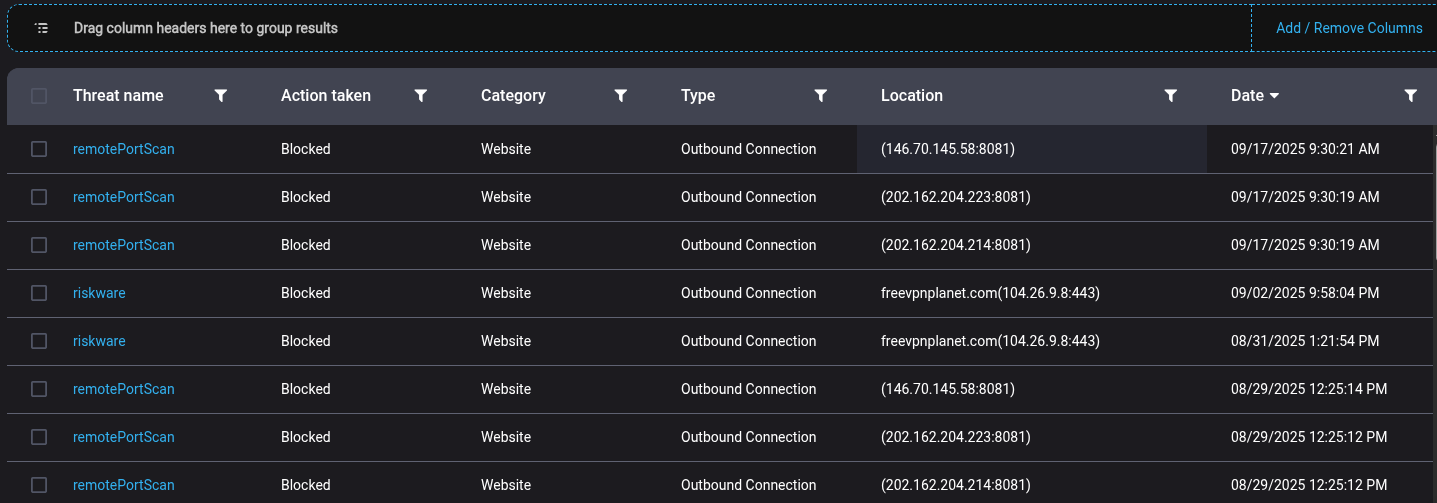
A straightforward Python script makes this process much more efficient. By extracting the IP addresses from your export, you can use Python’s requests and ipwhois libraries to automatically look up live WHOIS and geolocation data for each unique IP, outputting the results directly to your console. This lets you immediately determine whether outbound connections are going to well-known networks or questionable edge providers—helping you spot possible VPN use or suspicious traffic. Even with basic console output, this workflow speeds up your review process and delivers actionable context for follow-up.
import requests
import time
from ipwhois import IPWhois

ips = [
    “146.70.145.58”,
    “202.162.204.223”,
    “202.162.204.214”,
    “104.26.9.8”
]

for ip in ips:
    print(f”\n===== {ip} =====”)
    # GEO/IPINFO Lookup
    try:
        resp = requests.get(f’https://ipinfo.io/{ip}/json’, timeout=4)
        data = resp.json()
        print(f”Location: {data.get(’city’, ‘N/A’)}, {data.get(’region’, ‘N/A’)}, {data.get(’country’, ‘N/A’)}”)
        print(f”Org: {data.get(’org’, ‘N/A’)}”)
        print(f”Hostname: {data.get(’hostname’, ‘N/A’)}”)
    except Exception as e:
        print(f”IPInfo Error: {e}”)

    # WHOIS Lookup
    try:
        obj = IPWhois(ip)
        res = obj.lookup_rdap()
        print(”WHOIS Org:”, res[’network’][’name’])
        print(”WHOIS Description:”, res[’network’].get(’remarks’, [’‘])[0] if res[’network’].get(’remarks’) else ‘N/A’)
        print(”WHOIS CIDR:”, res[’network’][’cidr’])
        print(”WHOIS Country:”, res.get(’country’, ‘N/A’))
        print(”WHOIS Emails:”, res[’objects’][res[’network’][’handle’]][’contact’][’email’] if res[’network’][’handle’] in res[’objects’] else “N/A”)
    except Exception as e:
        print(f”WHOIS Error: {e}”)

    print(”-------------------------”)
    time.sleep(0.7)  # avoid any rate limit
This outputs to the console, but it is easy to save the data to csv etc.
Test it out!